Privacy and Awareness
Privacy and Awareness support two governance needs: privacy program execution and user awareness. Some tenants may use both; others may enable only one area.
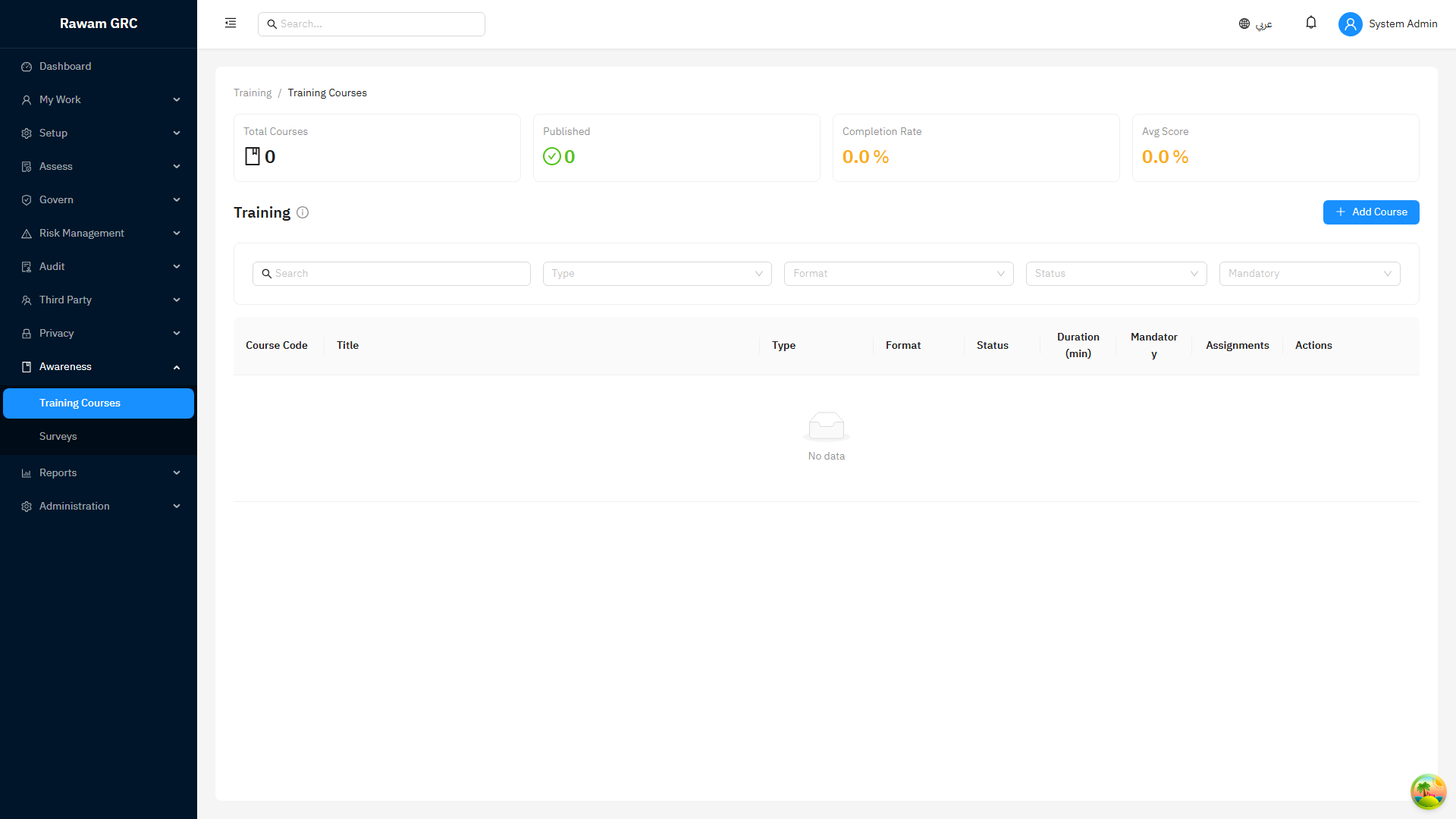
Privacy and Surveys are available by default. Training is an optional area that is turned off by default, because most customers run awareness training in a separate learning management system (LMS). A tenant can opt in to the built-in Training area by enabling its feature flag.
1. Background and Business Purpose
Privacy records explain how personal data is processed, protected, transferred, and handled when data subjects make requests. Surveys collect awareness, feedback, or control-understanding responses from users. Training records, when the area is enabled, prove that users receive required courses.
Main outcomes:
- maintain processing activity records
- manage DSARs and privacy impact assessments
- track consent records, cross-border transfers, and data flows
- assess PDPL readiness and run privacy automation
- maintain a data governance register
- create, assign, and analyze surveys
- optionally create, assign, and monitor training when the Training area is enabled
2. Privacy Records
| Record | Purpose |
|---|---|
| Processing Activity | Documents personal-data processing purpose, owner, systems, data categories, and legal/business context. |
| DSAR | Tracks data subject access or privacy rights requests. |
| Privacy Impact Assessment | Reviews privacy risk and controls for processing or projects. |
| Consent Record | Tracks consent basis and status where consent is used. |
| Cross-Border Transfer | Documents data movement between jurisdictions or external processors. |
| Data Flow Map | Shows how data moves between systems, owners, vendors, and locations. |
3. Privacy Operating Flow
- Open Privacy.
- Create or update the relevant privacy record.
- Assign owner and department.
- Link related asset, third party, policy, risk, or evidence.
- Complete required fields such as purpose, data categories, retention, transfer, and control context.
- Route through workflow when review or approval is required.
- Create issues or risks for gaps.
- Review records periodically.
4. DSAR Flow
- Create DSAR record.
- Enter requester, request type, received date, due date, and scope.
- Assign owner.
- Verify identity and request validity where required.
- Coordinate search, review, and response.
- Record response date and evidence.
- Close the request.
DSAR statuses:
| Status | Meaning |
|---|---|
| New | Request received. |
| Validating | Identity or request validity is being confirmed. |
| In Progress | Response work is underway. |
| Pending Approval | Response is awaiting review. |
| Completed | Response sent and documented. |
| Rejected / Cancelled | Request not processed with rationale. |
5. Privacy Impact Assessment Flow
- Create PIA.
- Describe processing/project and owner.
- Link assets, third parties, data flows, and policies.
- Identify privacy risks and controls.
- Set the privacy risk rating using likelihood and impact.
- Record recommendations and required actions.
- Submit for review if workflow is enabled.
- Close when actions are complete or accepted.
A PIA carries a privacy risk score calculated as Likelihood × Impact, producing a value from 1 to 25. Use the score to prioritize which assessments and required actions need attention first. Each PIA also follows a full lifecycle from draft, through review and approval, to completion or acceptance, so the assessment workload and unresolved exposure stay visible in reporting.
6. Consent, Cross-Border Transfers, and Data Flow Maps
Each of these is a dedicated register page under Privacy.
Consent Records
Use the consent register to record the lawful basis and consent status where processing relies on consent. For each record, capture the data subject or audience, purpose, consent basis, the date consent was given, and its current status (such as granted, withdrawn, or expired). Update the record when consent is withdrawn so downstream processing activities can be reviewed.
Cross-Border Transfers
Use the transfers register to document personal data moving between jurisdictions or to external processors. For each transfer, record the source and destination countries, the receiving party, the transfer mechanism or safeguard relied upon, the data categories involved, and the related processing activity. Link transfers to the relevant vendor and asset so cross-border exposure is visible in reporting.
Data Flow Maps
Use the data flow map to show how personal data moves between systems, owners, vendors, and locations. Build the flow from source to destination, attach the systems and assets involved, and link the related processing activities and transfers. Keep flows current when systems or processors change so PIAs and transfer reviews stay accurate.
7. Data Governance Register
The Data Governance register (Privacy → Data Governance) maintains accountable ownership and control over the organization's data categories.
| Record | Purpose |
|---|---|
| Data Category | A defined category of data with assigned steward and custodian, classification, and retention/disposal rules. |
| Data-Sharing Agreement | Records an agreement governing how a data category is shared internally or externally. |
| Quality Metric | Captures data quality metrics and scores for a category. |
| Data-Discovery Scan | Records a scan used to discover where data resides. |
Operating flow:
- Open Privacy → Data Governance.
- Create a data category with its steward, custodian, and classification.
- Set retention and disposal rules.
- Add any data-sharing agreements that apply.
- Record quality metrics and scores, and run data-discovery scans.
- Submit the record for review.
- The reviewer approves or rejects the record.
Each record follows a submit → approve/reject lifecycle so ownership, classification, and retention decisions are reviewed before they become authoritative.
8. PDPL Readiness and Automation
Readiness Dashboard
The readiness dashboard (Privacy → Readiness) gives a scored view of PDPL preparedness, broken down by area and individual check. For each check it shows:
- the mapped PDPL article
- the evidence required to satisfy the check
- automation actions that can help close the gap
- the current readiness score for the area and overall
Use the dashboard to see where the program stands, what evidence is missing, and which checks can be advanced through automation.
PDPL Automation
The automation page (Privacy → Automation) runs actions that accelerate readiness. Available actions:
| Action | Outcome |
|---|---|
| Generate policy pack | Produces a set of PDPL-aligned policies. |
| Generate remediation tasks | Creates tasks for the gaps identified in readiness. |
| Bootstrap documents | Creates the starter privacy documents the program needs. |
| Export evidence/document pack | Packages the privacy evidence and documents for review or audit. |
Each run is tracked with run and status information so you can confirm what was generated and when.
Monitoring and Gap Deadlines
PDPL monitoring gap-deadlines are suppressed for tenants that have no privacy footprint. Deadlines are only created once the tenant has at least one processing activity, DSAR, consent record, or privacy evidence record, so tenants that do not yet use the privacy area are not flagged with deadlines that do not apply to them.
9. Awareness and Training
Surveys are available by default; the Training area is optional and turned off by default. Enable the Training area only when the organization wants to run courses inside the platform instead of, or alongside, a separate LMS.
| Record | Purpose | Availability |
|---|---|---|
| Survey | Questionnaire used to measure awareness, feedback, or control understanding. | Available by default. |
| Training Course | Training content, quiz, file, or lesson record. | Requires the Training area to be enabled. |
| Training Campaign | Assignment of training to users or groups. | Requires the Training area to be enabled. |
| Role Requirement | Defines required courses for a role or job position. | Requires the Training area to be enabled. |
| My Training | User-facing list of assigned training. | Requires the Training area to be enabled. |
Training operating flow (when the Training area is enabled):
- Open Training.
- Create a training course with title, description, content, and completion rules.
- Publish the course when ready.
- Create role requirements or a training campaign.
- Assign users, roles, or departments.
- Monitor completion and overdue users.
- Review quiz results.
- Use reports for management follow-up.
Training statuses:
| Status | Meaning |
|---|---|
| Draft | Course is being prepared. |
| Published | Course can be assigned. |
| Assigned | User has training to complete. |
| In Progress | User started the course. |
| Completed | User completed required activity. |
| Overdue | Due date passed without completion. |
10. Surveys
Surveys collect awareness, feedback, or control-understanding responses from users and are available by default. The Surveys area has its own feature flag.
Survey Lifecycle
| Status | Meaning |
|---|---|
| Draft | Survey is being built and is not yet visible to respondents. |
| Active | Survey is published and assigned respondents can submit responses. |
| Closed | Survey no longer accepts responses; results remain available for analysis. |
Building and Assigning a Survey
- Open Surveys and create a survey while it is in Draft.
- Add questions, marking any that must be answered as required.
- Choose whether the survey is anonymous. An anonymous survey collects responses without attributing them to an individual respondent.
- Assign the survey to users.
- Move the survey to Active so assigned respondents can take it.
- Move the survey to Closed when collection is complete.
Responding to a Survey
Respondents see their assigned surveys on the My Surveys page, open an active survey, answer the questions, and submit. Required questions are enforced on submission: a response cannot be submitted until every required question is answered.
Analyzing Results
- Export all responses to CSV for offline review or record-keeping.
- Review per-question analytics, including the distribution of answers, the completion percentage, and the average time taken.
Anonymous surveys still produce aggregate analytics, but individual responses are not attributed to a respondent.
11. Roles and Permissions
| Role | Typical Responsibility |
|---|---|
| Privacy owner | Owns privacy records, DSARs, PIA, transfers, data governance, and PDPL readiness. |
| Data steward / custodian | Owns data categories, classification, retention, and quality in the data governance register. |
| Data/process owner | Provides processing context and evidence. |
| Survey coordinator | Builds surveys, assigns respondents, and reviews analytics. |
| Training coordinator | Creates courses, campaigns, and role requirements when the Training area is enabled. |
| Manager | Monitors assigned user completion. |
| End user | Completes assigned surveys, training, or acknowledgements. |
12. Cross-Module Behavior
| Related Module | Overlap |
|---|---|
| Assets and Third Parties | Privacy records should link systems, data assets, processors, and transfer parties. |
| Risk Management | Privacy risks can be created from PIA gaps, incidents, or processing weaknesses. |
| Operations | DSAR delays, privacy gaps, and training overdue items can become issues/actions. |
| Governance | Privacy policies and acknowledgements support privacy compliance. |
| Incidents | Privacy incidents may require DSAR/context review and risk updates. |
| Reports | Completion rates, overdue training, DSAR status, and PIA progress feed reporting. |
13. Related Pages
| Related Page | Why It Matters |
|---|---|
| Third Parties and Assets | Processing activities, transfers, and privacy impact often depend on vendors, systems, and assets. |
| Risk Management | Privacy issues may create risks or change residual exposure. |
| Governance | Privacy policies, notices, exceptions, and approvals provide governance traceability. |
| Operations | DSAR tasks, incidents, corrective actions, and training follow-up require operational tracking. |
| Reports and Analytics | Privacy records, awareness completion, overdue work, and incidents feed reporting. |
| Permissions and Roles Matrix | Use this before granting access to sensitive privacy records. |
14. Before You Start, Reporting Impact, and Common Mistakes
Before using privacy and awareness records, confirm privacy owner roles, data category taxonomy and stewardship, vendor and asset links, lawful basis expectations, DSAR ownership, survey audiences, and whether the optional Training area should be enabled.
Records that change reports and KPIs:
| Record or Field | Reporting Impact |
|---|---|
| Processing activity status | Drives privacy inventory completeness. |
| PIA status and Likelihood × Impact score | Shows privacy assessment workload and unresolved exposure. |
| DSAR status and due date | Drives request SLA and overdue reporting. |
| PDPL readiness score | Shows program preparedness by area and check. |
| Survey status and responses | Drives survey completion and per-question analytics. |
| Training assignment and completion | Changes awareness completion and overdue training KPIs when the Training area is enabled. |
| Linked vendor, asset, or transfer | Creates privacy dependency and cross-border reporting context. |
Common mistakes:
- Recording processing activities without owner, purpose, data category, or vendor/asset context.
- Leaving DSAR due dates unmanaged.
- Treating survey assignment, or training assignment, as completion.
- Granting broad privacy access without reviewing role need.
- Not linking privacy risks or incidents to operational follow-up.
- Leaving data governance records unsubmitted, so classification and retention are never approved.
Use this module page when training privacy owners on processing records, PIA review, DSAR follow-up, PDPL readiness, data governance, and survey checks. Screenshots and operating guidance should stay with the module rather than a separate screenshot menu.
15. Administrator Checklist
- Assign privacy records to accountable owners.
- Link processing activities to assets and third parties.
- Track DSAR due dates carefully.
- Use the PDPL readiness dashboard and automation to close gaps and gather evidence.
- Submit data governance records for review so classification and retention are approved.
- Create risks or issues for high-impact privacy gaps.
- Mark required questions on surveys and review per-question analytics.
- Enable the Training area only if courses are run inside the platform; publish courses only when content is ready.
- Use role requirements for recurring mandatory training when the Training area is enabled.
16. Screenshot