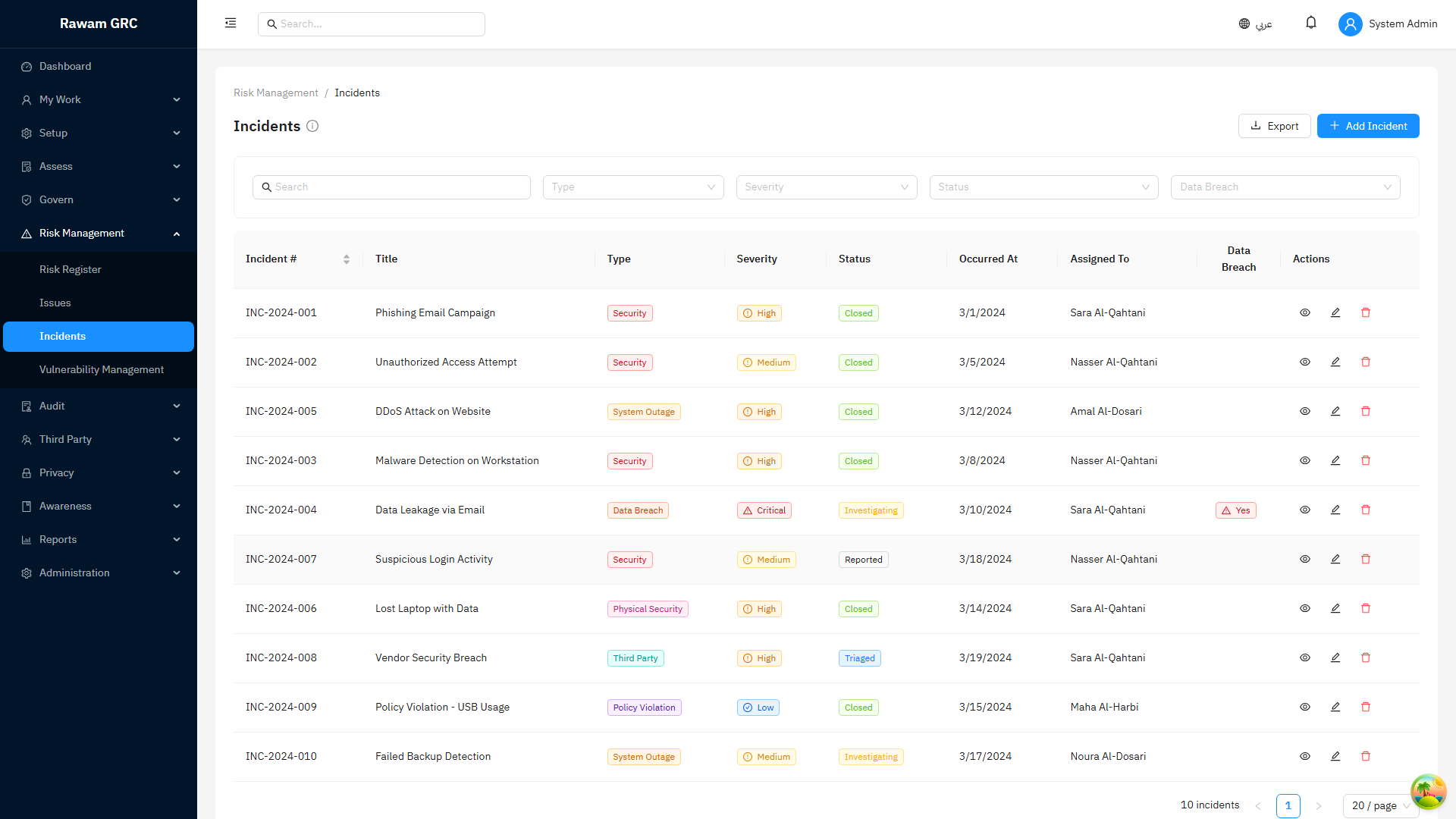
Operations
Operations manages execution-heavy follow-up work: issues, actions, incidents, regulatory changes, remediation, and calendar obligations.
1. Background and Business Purpose
This module is where governance, risk, audit, and compliance outputs become assigned work. It gives administrators a place to track owners, due dates, progress, escalation, and closure evidence.
Main outcomes:
- manage corrective actions and remediation
- respond to incidents
- track regulatory change obligations
- monitor deadlines through calendar
- connect operational work back to risks, assessments, audits, policies, and reports
2. Core Records and Actors
| Item | Meaning |
|---|---|
| Issue | Remediation or corrective action item from assessment, audit, risk, incident, or manual entry. |
| Action | Task assigned to an owner with status and due date. |
| Incident | Operational, security, privacy, or compliance event requiring response. |
| Regulatory Change | External requirement or change that must be reviewed and acted on. |
| Calendar Event | Deadline, review date, due date, or scheduled obligation. |
| Actor | Responsibility |
|---|---|
| Issue owner | Completes remediation and uploads evidence. |
| Incident manager | Coordinates incident response and closure. |
| Compliance/risk manager | Reviews priority, escalation, and cross-module impact. |
| Action owner | Completes assigned action. |
| Approver | Confirms closure where workflow applies. |
3. Issues and Actions Flow
- Open Operations then Issues & Actions or Remediation Hub.
- Create an issue manually or open one generated from assessment/audit/risk.
- Confirm title, source, severity/priority, owner, due date, and description.
- Add remediation plan.
- Assign actions if work must be split.
- Owner updates status and adds comments/evidence.
- Reviewer verifies completion.
- Close issue when remediation is complete and evidence is acceptable.
Issue statuses:
| Status | Meaning |
|---|---|
| Open | Issue exists and needs action. |
| InProgress | Owner is working on remediation. |
| PendingVerification | Owner submitted completion for verification. |
| Resolved | Remediation completed. |
| Closed | Issue verified and closed. |
| Deferred | Action postponed to a later date. |
| Cancelled | No longer required. |
4. Incident Flow
- Open Incidents.
- Click Create Incident.
- Enter title, type, severity, affected asset/vendor/user/process, date, and description.
- Assign incident manager and owner.
- Record containment, investigation, root cause, and impact.
- Link related risks, assets, third parties, privacy records, or policies.
- Create actions for remediation.
- Review and close when response and evidence are complete.
Incident statuses:
| Status | Meaning |
|---|---|
| Reported | Incident logged but not yet triaged. |
| Triaged | Severity, owner, and scope have been confirmed. |
| Investigating | Root cause and impact are under review. |
| Containment | Immediate impact is being controlled. |
| Eradication | The cause is being removed from affected systems. |
| Recovery | Normal operations are being restored. |
| PostIncident | Lessons learned, follow-up actions, and documentation are being completed. |
| Closed | Incident is resolved and documented. |
5. Regulatory Changes
Use Regulatory Changes to monitor external obligations.
Recommended flow:
- Create regulatory change record.
- Enter source, summary, effective date, impacted areas, and owner.
- Assess impact on policies, controls, risks, training, privacy, or operations.
- Create issues or change requests for required updates.
- Track implementation and evidence.
- Close when obligations are addressed.
6. Calendar
Calendar consolidates due dates and review dates from modules.
Common calendar items:
- assessment planned end dates
- risk review dates
- treatment action due dates
- issue due dates
- policy review dates
- audit dates
- incident follow-up dates
- regulatory effective dates
Administrator rule: calendar is a visibility layer; update the source record to change the obligation.
7. Workflows and Approvals
Workflows let administrators standardize how records move through review, approval, and follow-up. A workflow definition is a named, reusable process made of ordered steps, and it can be attached to many entity types so the same approval pattern can govern issues, incidents, policies, exceptions, change requests, and other records.
Each step has a unique identifier within the workflow and a step type that controls what happens when work reaches it:
| Step Type | Purpose |
|---|---|
| Approval | Requires an assignee to approve or reject before the record advances. |
| Review | Requests a review without a formal approve/reject decision. |
| Task | Assigns work that must be completed to continue. |
| Notification | Sends an automated notice to the assignee or stakeholders. |
| Parallel | Runs multiple branches at the same time before continuing. |
| Condition | Routes the record down different paths based on rules. |
Each step is assigned using one of the following assignment types:
| Assignment Type | Resolves To |
|---|---|
| User | A specific named user. |
| Role | Anyone holding the selected role. |
| Manager | The manager of the record owner or submitter. |
| Creator | The user who created the record. |
| Owner | The current owner of the record. |
Steps can also carry a timeout and escalation rule, so work that is not actioned in time is escalated automatically.
Building and running workflows:
- Workflows → Builder opens a visual canvas where steps and connections are arranged graphically.
- Workflows → Wizard offers a guided list-based builder for creating a definition step by step.
- My Workflow Tasks is the personal queue where assignees see and action the workflow steps waiting on them.
Administrator rule: give every step a clear, unique identifier and a defined assignee, timeout, and escalation path so no record can stall silently.
8. SLA Monitoring
SLA policies set the time targets a record must meet, typically a response target and a resolution target. The platform watches active records against these targets and records breaches automatically.
How it works:
- An SLA policy defines response and resolution targets for the records it covers.
- A background monitor runs about every 15 minutes, scoped per tenant, comparing active records against their targets.
- When a target is missed, the monitor raises a violation and runs any configured escalation rules.
- Recorded breaches are listed under SLA → Violations for review and follow-up.
This monitoring also covers privacy timelines, including the 30-day PDPL escalation for data subject access requests (DSAR), so requests approaching or exceeding the statutory window are escalated.
Administrator rule: align SLA targets with regulatory and contractual commitments, and review SLA → Violations regularly to confirm escalation is reaching the right owners.
9. Webhooks
Webhooks let the platform notify external systems when events occur, so operational events can drive downstream automation.
From the webhooks area, administrators can:
- create a webhook and subscribe it to the relevant events,
- send a test event to confirm the endpoint receives and accepts deliveries,
- regenerate the signing secret used to verify that deliveries are authentic,
- view a delivery log showing the outcome of each attempt.
Delivery reliability:
- Failed deliveries are retried automatically by a background worker.
- Retries honor the configured maximum number of attempts and the backoff schedule.
- A delivery can also be retried manually from the delivery log.
Administrator rule: store the signing secret securely, verify it on the receiving side, and regenerate it if it may have been exposed.
10. Import and Export
Most list pages include an import and export modal, so data can be loaded and extracted without leaving the record list. Import supports the following record types, each with a downloadable CSV template that defines the expected columns:
- Users
- Departments
- Job Positions
- Assets
- Controls
- Risks
- Vendors
Recommended flow:
- Open the import and export modal from the relevant list page.
- Download the CSV template for the record type.
- Fill the template, keeping the column headers unchanged.
- Upload the completed file and review the validation result before confirming.
The previous standalone import page has been retired and now redirects users to this in-list import experience.
11. Inbox and Notifications
The platform provides two ways to stay on top of assigned and incoming work:
- Inbox collects items that need attention and supports snoozing an item so it returns later when it is relevant.
- Notifications is the alerts center reached from the notification bell. It shows an unread count and lets users mark a single notification as read or mark all as read at once.
Administrator rule: encourage owners to clear the Inbox and Notifications regularly so escalations and approvals are not missed.
12. Cross-Module Behavior
| Related Module | Overlap |
|---|---|
| Compliance and Assessments | Findings can create issues; issue creation can flag linked risks for reassessment. |
| Risk Management | Risks can create issues and treatment actions; incidents can link to or create risks. |
| Audit | Findings become issues/actions and feed remediation status. |
| Governance | Policy gaps and change requests create operational work. |
| Assets and Third Parties | Incidents and issues can be linked to affected assets/vendors. |
| Reports | Overdue items, incident trends, and remediation status feed reporting. |
13. Related Pages
| Related Page | Why It Matters |
|---|---|
| Compliance and Assessments | Non-compliant and partially compliant controls can create issues and remediation work. |
| Risk Management | Risk treatment actions, incidents, and accepted exposure depend on operational follow-up. |
| Governance | Policy exceptions and change requests can create operational actions. |
| Audit Management | Audit findings use operations records for remediation tracking and closure evidence. |
| Reports and Analytics | Overdue issues, actions, incidents, and calendar events appear in dashboards and reports. |
| Workflow and Status Reference | Use this to interpret issue, finding, incident, approval, and action states. |
14. Before You Start, Reporting Impact, and Common Mistakes
Before using operations records for remediation tracking, confirm issue categories, priorities, owners, due date rules, escalation expectations, and closure evidence rules. Operations is the execution layer; poor ownership here weakens every upstream GRC module.
Records that change reports and KPIs:
| Record or Field | Reporting Impact |
|---|---|
| Issue or action status | Changes open, in-progress, overdue, resolved, and closed counts. |
| Owner and due date | Drives accountability and overdue reporting. |
| Incident severity | Changes incident trend and escalation reporting. |
| Regulatory change status | Shows whether external changes are reviewed and acted on. |
| Closure evidence | Supports auditability and management confidence. |
Common mistakes:
- Creating issues without owner and due date.
- Closing actions without evidence or review notes.
- Using cancelled status instead of documenting why work is no longer required.
- Leaving incidents disconnected from risks, assets, vendors, or policies.
- Ignoring overdue items because they are not assigned to the right owner.
Use this module page when training users on issue creation, incident follow-up, action closure, and calendar review. Screenshots and operating guidance should stay with the module rather than a separate screenshot menu.
15. Administrator Checklist
- Require owner and due date for actionable issues.
- Use severity/priority consistently.
- Link issues to source module records.
- Review overdue issues and actions weekly.
- Link incidents to affected assets/vendors where applicable.
- Create risks for material incidents or recurring issues.
- Do not close issues without evidence or reviewer confirmation.
16. Screenshot